Ragdoll Part
This component requires a Rigidbody and CollisionHandler on the same gameObject!
This component has an Event Linker.
The RagdollPart component works with a Ragdoll to create a physics-based creature. Each limb requires its own component with a reference to the bone it controls.
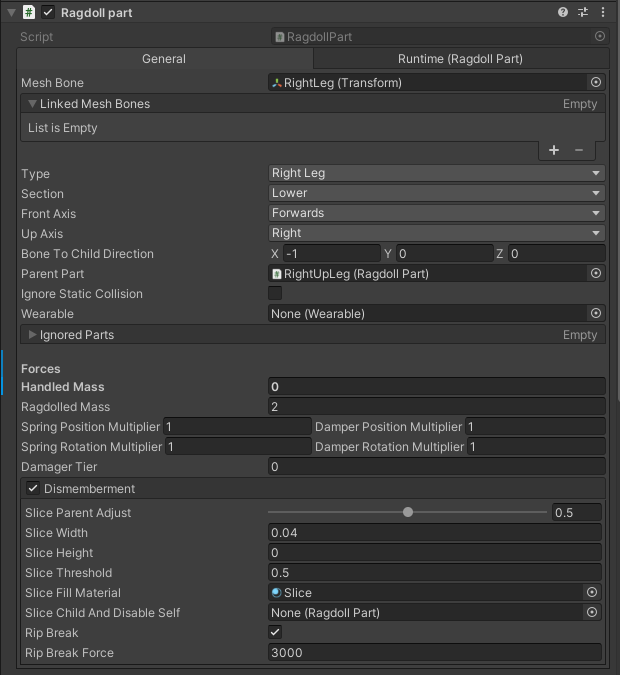
| Field | Description |
|---|---|
| meshBone | The bone transform this part is attached to |
| linkedMeshBones | A list of linked bones this part is attached to, useful for a root part or large amount of bones |
| type [Flags] | The type of this part - Head - Neck - Torso - LeftArm - RightArm - LeftHand - RightHand - LeftLeg - RightLeg - LeftFoot - RightFoot - LeftWing - RightWing - Tail |
| section | The section of this part - Full - Lower - Mid - Upper |
| boneToChildDirection | The direction of the child bone. This is used to calculate the direction your blade must hit to slice this part |
| parentPart | The parent of this part, this should be the parent bone of this meshBone |
| ignoreStaticCollision | Whether to ignore static colliders |
| wearable | The child Wearable component |
| ignoredParts | Other parts in this ragdoll that this part’s colliders should ignore |
| handledMass | The mass of this part when grabbed |
| ragdolledMass | The mass of this part when active in the ragdoll |
| damagerTier | The tier of damage this part should inflict when it collides with a surface. This is the same as an item tier as Damager JSONs are tiered |
Position Forces
| Field | Description |
|---|---|
| springPositionMultiplier | The multiplier for this part’s position spring value |
| damperPositionMultiplier | The multiplier for this part’s position damper value |
Rotation Forces
| Field | Description |
|---|---|
| springRotationMultiplier | The multiplier for this part’s rotation spring value |
| damperRotationMultiplier | The multiplier for this part’s rotation damper value |
Dismemberment
| Field | Description |
|---|---|
| sliceAllowed | Whether this part can be sliced |
| sliceParentAdjust | How much the parent part should be adjusted when this part is sliced |
| sliceWidth | The width of the sliceable area |
| sliceHeight | The height of the sliceable area |
| sliceThreshold | The threshold for this part to be sliced |
| sliceFillMaterial | The material applied to the inside of this part when it gets sliced |
| sliceChildAndDisableSelf | Disable this part collider and slice the referenced child part on slice (usefull for necks) |
| ripBreak | Whether this part can be ripped (Like the martial protege skill) |
| ripBreakForce | The force required to rip this limb off if ripBreak is enabled |
Linked Parts
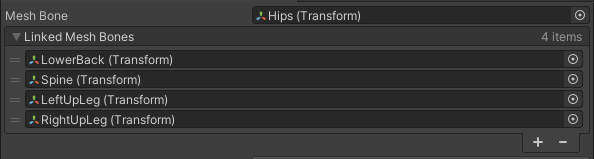
The Linked Mesh Bones list should be filled with bones this part covers. A hand may only require the main Mesh Bone, whereas the root bone would require LowerBack, Spine, LeftUpLeg and RightUpLeg to create a large enough part.
Collision
Every part, including the root will need a CollisionHandler on the part and a ColliderGroup as a child of the part gameObject. Colliders can be aligned in whatever way you’d like but it’s recommended to keep these shapes simple.
Creating a Character Joint
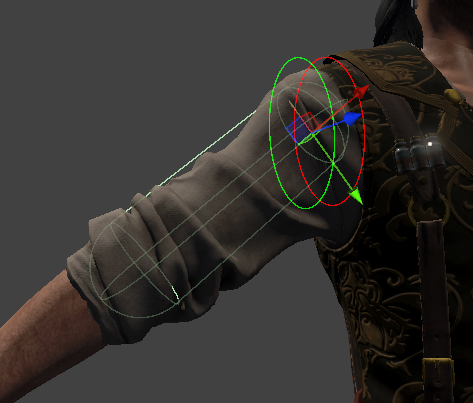
Every part except the root requires a CharacterJoint component with correctly defined limits. Refer to the gizmos on this component to see how they are set up. This component also needs a Connected Anchor which should be automatically configured.
Every CharacterJoint should be connected to its parent part, this will be unique for every rig but for instance:
- Hips (Blank)
- Spine (Connected to Hips
Rigidbody) - Spine1 (Connected to Spine
Rigidbody) - RightArm (Connected to Spine1
Rigidbody) - LeftArm (Connected to Spine1
Rigidbody)
Converting to other parts
Parts can be converted to more specific types of limb with buttons under the Runtime section.
Convert To Handwill create a RagdollHandConvert To Footwill create a RagdollFoot